
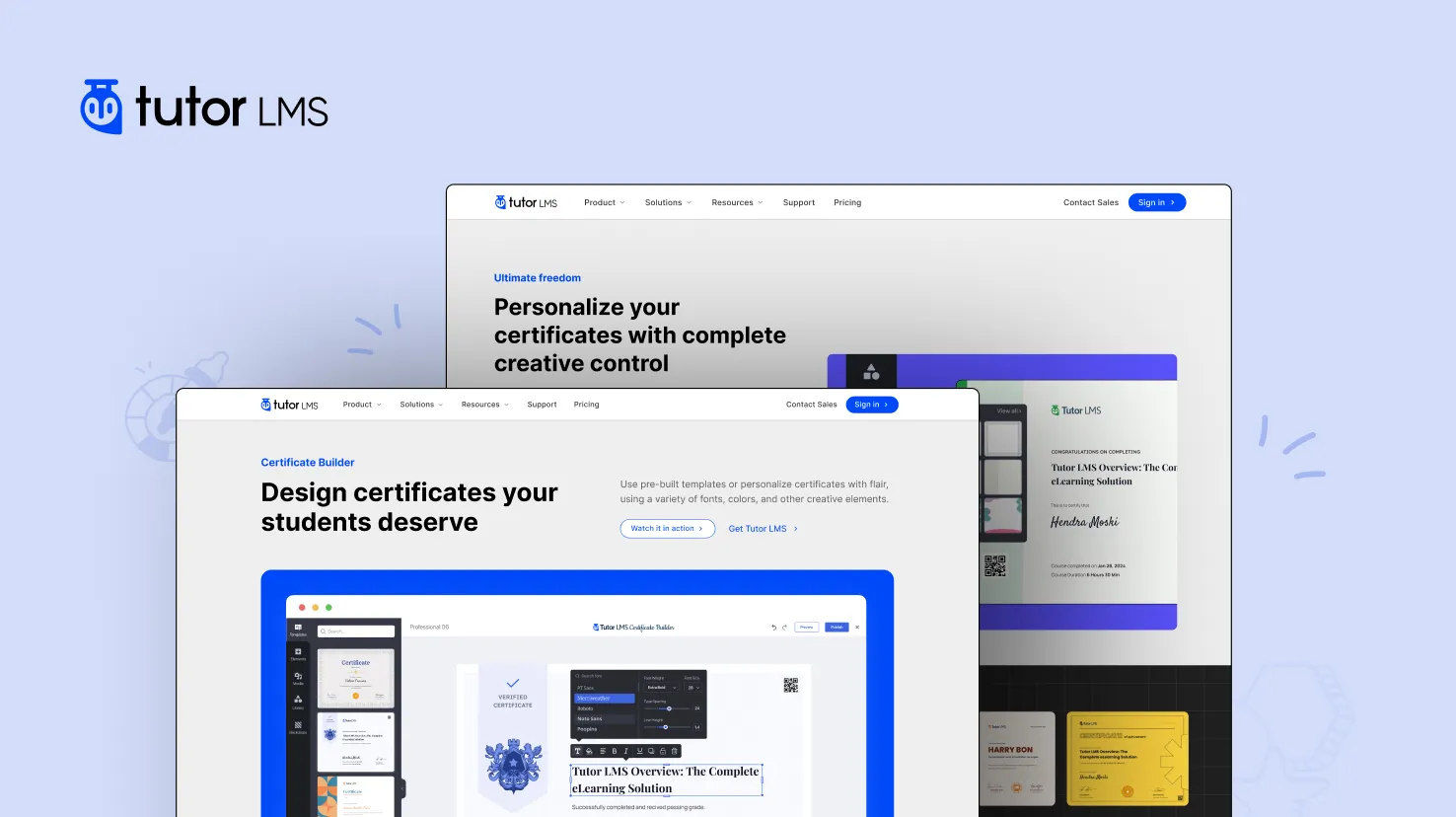
Tutor LMS Certificate Builder is a powerful WordPress plugin add‑on for Tutor LMS that lets you design fully customizable course completion certificates with a drag & drop builder. It allows educators and course creators to build stunning, professional certificates that automatically issue to students when they complete a course.
🔥 What Is Tutor LMS Certificate Builder?
Tutor LMS Certificate Builder is an add‑on for Tutor LMS Pro that provides a visual certificate design interface. With this tool, you can build certificates exactly how you want them — no coding required.
It is included with Tutor LMS Pro, and once installed and activated, it lets you create your own certificate templates and assign them to courses. by Tutor LMS Certificate
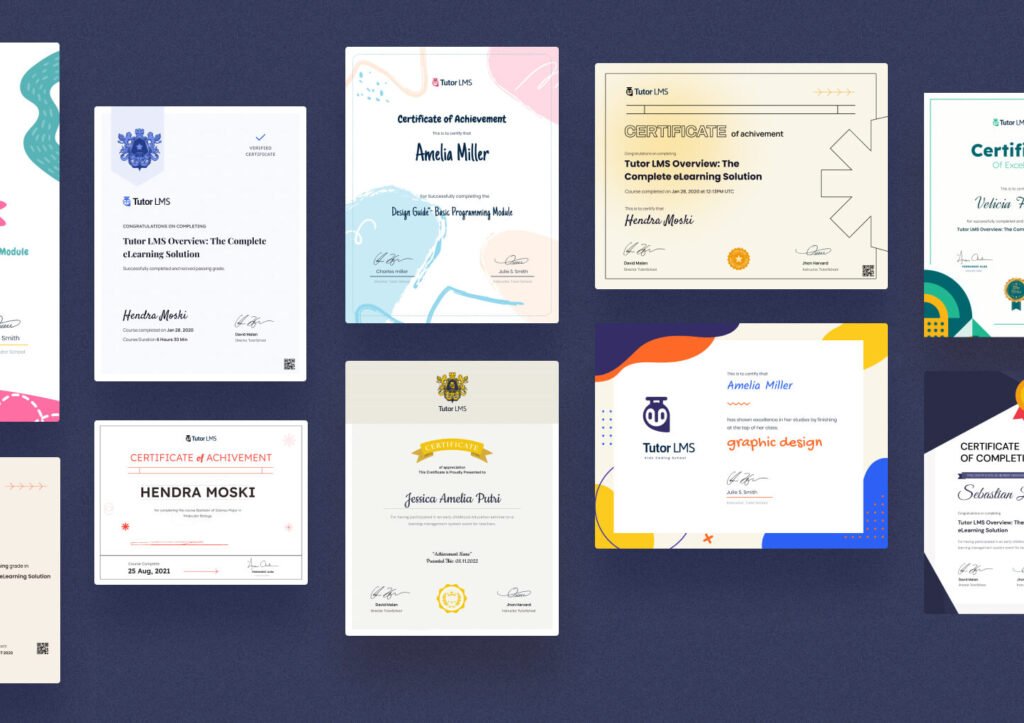
🧠 Key Features of Tutor LMS Certificate
✅ Drag‑and‑Drop Tutor LMS Certificate Builder– Build certificates using a visual editor with full creative control.
✅ Pre‑Built Templates – Start with ready templates and customize colors, fonts, layouts, and more.
✅ Dynamic Content – Insert dynamic fields such as student name, course title, date, instructor, and more.
✅ Custom Fonts & Colors – Choose from 1000+ Google Fonts and brand colors to match your style.
✅ Signature & Verification Id – Add instructor signatures and verification IDs for authenticity.
✅ Unlimited Certificates – Create any number of certificates for different courses or purposes.
📌 How It Works –Tutor LMS Certificate Builder
- Install & Activate:
- You need Tutor LMS Pro license first.
- Then install the Certificate Builder plugin from your Tutor LMS account downloads.
- Enable Certificate Add‑On:
- Go to Tutor LMS Pro > Add‑Ons and enable Certificates.
- Open Certificate Builder:
- Navigate to the Certificate section in Tutor LMS and click Create Certificate to launch the drag‑and‑drop editor.
- Design & Publish:
- Customize the template with student name, course title, signatures, badges, QR codes, and more.
- Save it and assign it to your courses.
🎓 Benefits of Using Certificate Builder
- ❇️ Professional certificates boost student satisfaction.
- 🏆 Certificates increase course completion motivation.
- 📣 Students can share certificates on social media.
- 💼 Helps build credibility and branding for your LMS site.
⚠️ Important Notes
✔️ You must have Tutor LMS Pro installed and activated — the Certificate Builder works only when Pro is active.
✔️ The certificate feature is included free with Tutor LMS Pro, but you need the valid license to download and install it.
25 Responses
Someone recommended fl88betapp and I’m glad they did! It’s exactly what I needed. Simple to use and effective. Check it out: fl88betapp
Hey guys, just wanted to drop a quick note about 585bet1. I was browsing around and stumbled onto it. Easy to use interface is my thing. Worth a peek if you’re looking for something new. My personal opinion. 585bet1
Yo, anyone tried 585bet10 yet? I’m always on the lookout for new places to play. It seems solid, and has a decent variety of games available. Just my two cents! 585bet10
The jollyphlogin process is actually painless, which is a huge plus. No annoying verification hoops to jump through. Thumbs up! jollyphlogin
Alright, so I stumbled upon 66233vn and thought, ‘why not?’ Honestly, pretty impressed with the mobile experience. Runs smooth on my phone, and I haven’t had any issues. Good for a quick spin when you’re on the go. Give 66233vn a download!
Been playing around on kl99bet for a while now, and I’m pretty happy with it. Withdrawals are quick, which is key for me. Games run smoothly and there’s a solid selection to choose from. Thumbs up for kl99bet!
Indusbet is a pretty solid portal. Nothing to complain about. Good support, simple interface overall. Just what I needed to start making some money again! Come join the fun and learn more here: indusbet.
Odds96aviator, now that’s a niche! If you’re an Aviator fan, this might be your jam. Odds seemed competitive. Soar into the action at odds96aviator!
Sara777rate – Couldn’t really find what the ratings were all about on the site, but the concept is interesting! Always good to check the rates before jumping in. Consider browsing their ratings at sara777rate!
Okay, wjevocasino is where I go when I’m feeling lucky. They’ve got a good selection of games and the bonuses are pretty decent. Just remember to gamble responsibly! Worth a shot if you’re looking for some casino action wjevocasino.
mcw678com is a reliable platform. Been playing here for a while and haven’t had any issues. They seem to keep things updated which is always a good sign. Give it a try. Find them at mcw678com!
JL55 Login was straightforward. No problems getting in. Site looks decent enough, gonna have a look around. jl55login rocks!
PHJoyClub, man, it’s got a vibe. Good times to be had there. Decent promos too. Have fun at phjoyclub
Spotted a55gamedownload and the download speeds are impressive! The selection is pretty neat too, especially for mobile games. Here’s the link: a55gamedownload
Heard about bigbola from a friend, decided to check it out. Lots of game options, good promotions. Pretty solid overall. You can give it a peek here: bigbola
Just downloaded tải b66 club, pretty easy to install. Let’s see how lucky I get! You can download it here: tải b66 club
Been playing ‘b66.club game đổi thưởng’ for a bit. The ‘đổi thưởng’ part definitely caught my attention. It’s fun, and I’ve managed to win a few times. You might like it: b66.club game đổi thưởng
I’ve been playing at Seu Bet for a while now, and I’m generally pretty happy with them. Payouts are quick, and the selection of games is nice. seu bet
32wim is a decent spot to play. Could use some improvement with their interface but otherwise it is a great one. Give it a try!
I hit a small jackpot on 95jlslot! I like this platform becacuse they have generous promos.
For you, who like to bet, I know alfabetapostas. Nice betting site! You should check here: alfabetapostas
Hey guys, give dito777casino a go if you want something different. I enjoy play in this casino, and you? Find dito777casino here: dito777casino
Yo, check out Kingpk999! Heard some good things about it from my buddies. Gonna give it a shot tonight, fingers crossed! More bets, more fun, right? kingpk999